2013-03-07

Tolino Shine: Also mir gefällt das Ding sehr gut

Empfehlung: Kaufen; wie immer aber nicht ohne sich vorher zu informieren.

Ebook reader waren mir immer ein Dorn im Auge, sei es die Auflösung, umständliche Bedienung, zusätzlicher Lichtbedarf, Inkompatibilität unter den Formaten und dann natürlich der Preis.

Nun gibt es ja zum Glück Amazon mit den Kindle Readers, doch so wirklich haben diese mich noch nie angesprochen, doch der Preis von $69 ist schon sehr nah am Spontankauf.

Das grösste Problem wie immer ist, dass ich meine mehrere hundert Bücher umfassende Sammlung nicht einfach so auf den Reader bekomme; zum Teil gibt es keine Ebooks, dann sind viele ungeheuer Teuer, so dass sich der Neukauf nicht wirklich lohnt. Bin immer noch am überlegen, ob ich mit iPone scanne und mit OCR in ePub umwandle, speziell mit dem Kartonscanaufbau zum selbermachen. Auch kann ich von Kindle nicht einfach auf Sony TRS umsteigen etc. Meine Bücher kaufe ich meistens auf iBooks und die bekomme ich nirgends mehr drauf. Zum Guten Glück habe ich eine ziemlich grosse ePub Sammlung von früher mit einigen wichtigen Titeln, doch leider ist es nicht einfach zu wissen wo jetzt welche Bücher sind. 

Seit einigen Wochen fragen mich unheimlich viele über die Tablets und Ebook reader und was ich denn so denke. Für viele ist es das iPad (speziell mit Retina Display)/iPad mini, dann klar der Kindle Paperwhite $119 und es war immer der Sony PRS-T1, doch nun kommt der Tolino und für die meisten hier ist dies das Gerät, welches jetzt kaufen muss. Der Bookeen HD Frontlight und Kobo Glo haben es einfach nicht so richtig geschafft; ich meine auf meine Liste.

Die Gründe für iPad: 
  • Farbe, multifunktionalität, Batterie ok
Die Gründe für Kindle Paperwhite:
  • Bester Shop für englische Bücher, bestes und preiswertestes Gerät, Software top
Die Gründe für PRS-T1:
  • ePub (grosse Vielfalt in verschiedenen Sprachen), leicht
Nun also der tolino shine:
  • Preis, ePub, software ok, licht, Shop für mehr Länder, zentraler Knopf

Der Tolino erfüllt nach meinem eingehenden Test alle Bedürfnisse mit Gut für jeden Durchschnittsbürger. Es funktioniert sofort alles, die Software und Bedienung gehen gut von der Hand,  zum Teil rudimentär; es fehlen einige Funktionen, doch für die allermeisten Bücherleser ist es genau richtig.

Der Preis in Deutschland ist gut, in der Schweiz sollte man ihn noch nach unten korrigieren, generell Top.

Ich habe nicht alle Angaben die ich gerne hätte jedoch hier meine Vermutungen, auf Grund von Open source Lizenzen und angaben vom Gerät:

  • Android 2.3.3
  • Linux 2.6.35.3
  • Garantiegeber: Longshine Technologie GmbH, Augsburg
  • Wie lange hält der Akku, wenn das Licht immer eingeschalten ist.
  • Garantie für Firmware updates?, stetige Verbesserung der Software?
Interessant ist auch, ob der Tolino mit anderer Software zum Laufen kommt ;), egal 

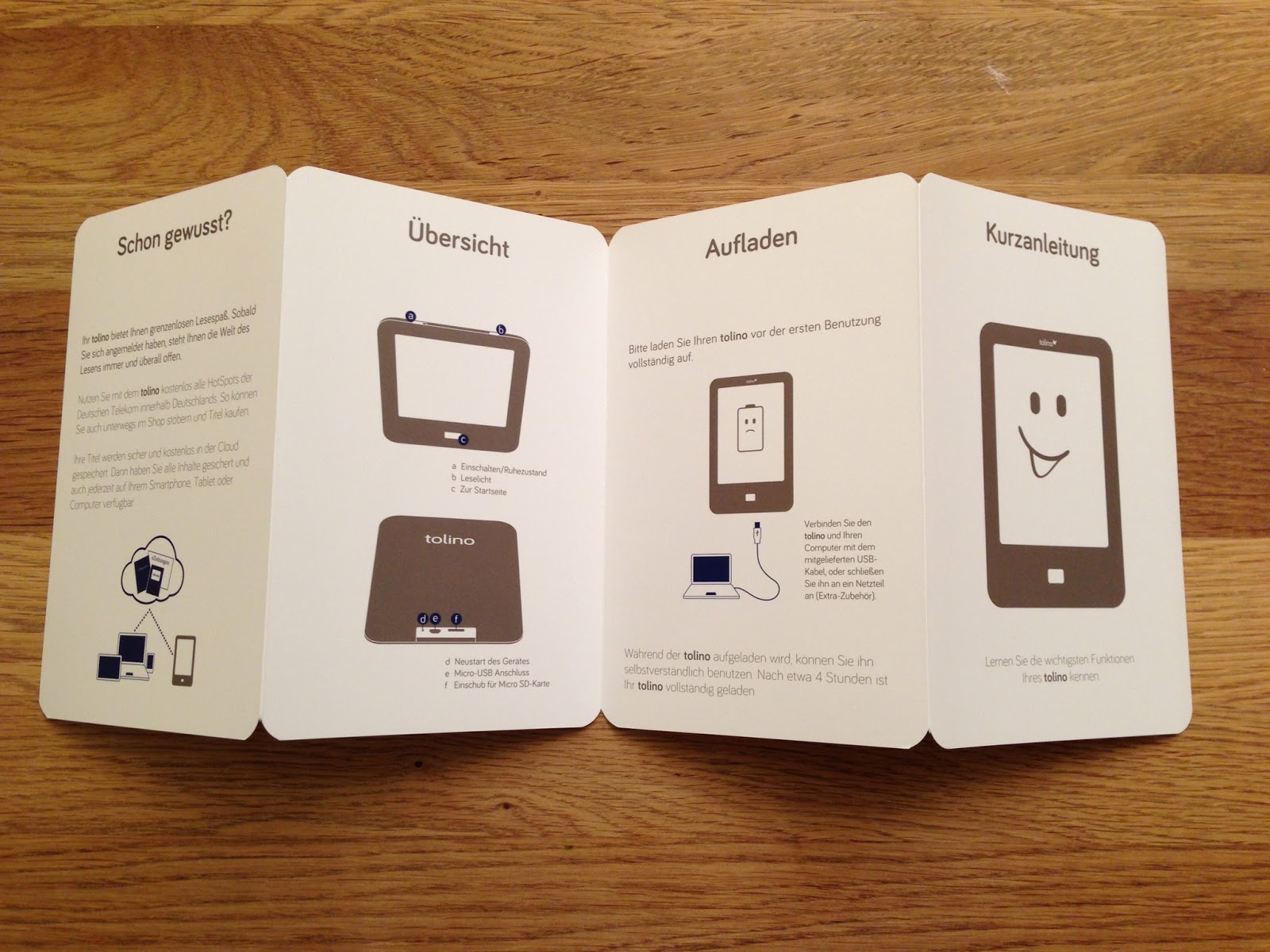
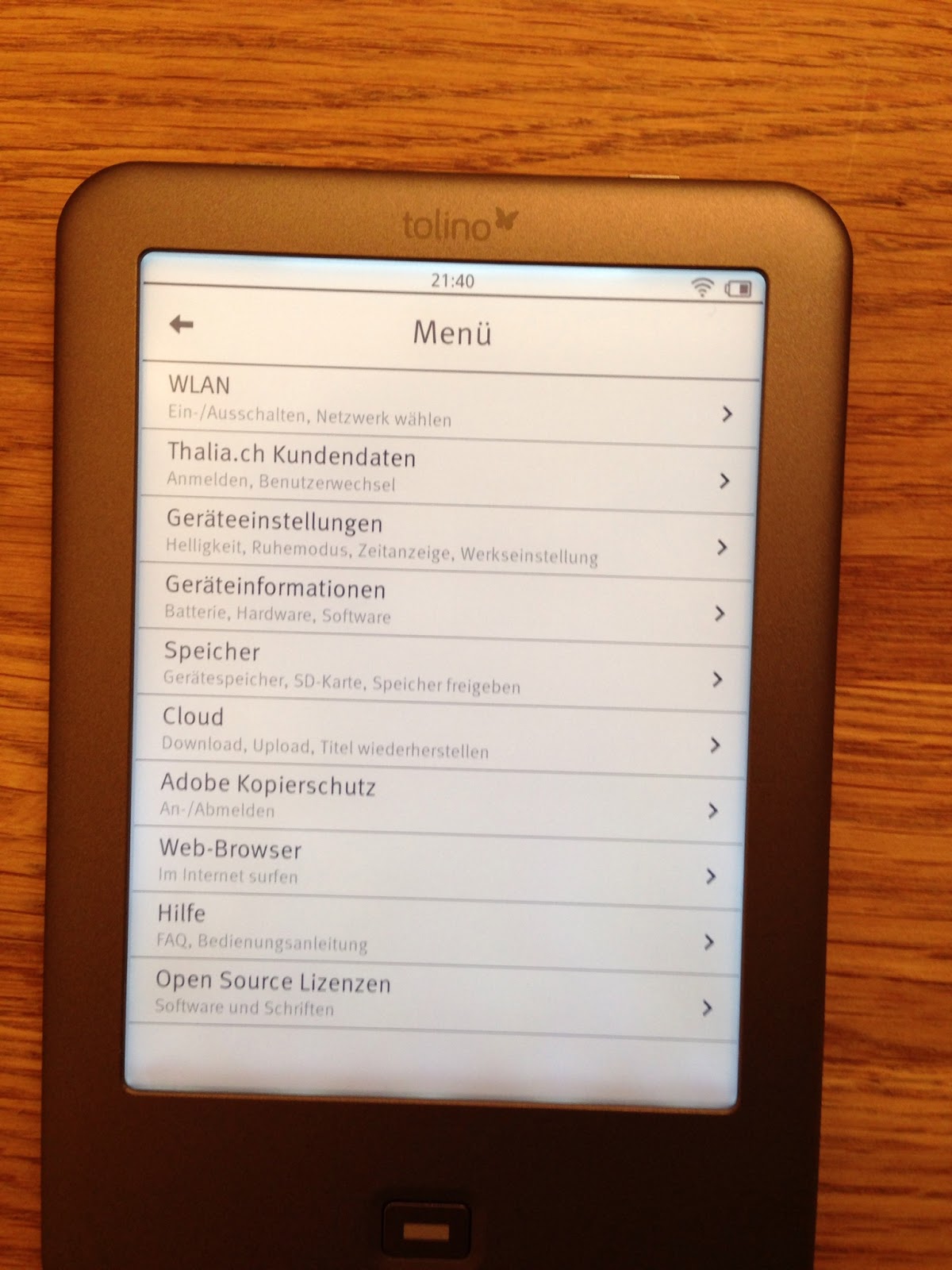
Hier die Bilder:


So nun kommen wir zum Kapitel, was gefällt mir den nicht:

  • Hintergrundlicht im unteren Bereich nicht zufriedenstellend, siehe auch letztes Foto. In einem anderen Blog http://blog.the-ebook-reader.com/2013/03/04/tolino-shine-ereader-with-hd-screen-android-and-frontlight-hits-germany/, auch im Video dort sieht die Hintergrundbeleuchtung viel besser aus. Vielleicht ein Grund mein Gerät auszutauschen. (Notiz: habe weder den Eintrag gelesen, noch das Video wirklich angeschaut, d.h. ich weiss noch nicht was da Berichtet wurde, für mich war es nur ein Vergleich für das Licht)
    • Leider ist auch beim Paperwhite das Licht nicht wirklich toll
  • Schärfe, d.h. zum Teil stellt der Tolino gewisse Textpassagen etwas unscharf an, was ich mir eigentlich nicht so bewusst war. Die Fotos auf der offiziellen Seite und auch auf diversen News Seiten sind deutlich zu kontrastreich und scharf. Doch das Display gefällt.
  • Software
    • Die Software gefällt mir gut, jedoch hat es einige Sachen die Dringend angegangen werden sollten.
      • Startseite ist nicht ok, ich möchte direkt mit meiner Bibliothek beginnen.
      • Koordination zwischen Hauptknopf, Wischen oder Navigationselementen ist nicht sauber durchdacht. Extrem mühsam, dass man nicht durch die Bibliothek wischen kann, so auch nicht durch das Inhaltsverzeichnis
      • Zugriff auf mehr Einstellungen von überall her, auch um den Webbrowser zu starten.
      • Springen im Buch, mit Möglichkeit wieder zurückzukehren
      • Anzeige der verbleibenden Seiten im Kapitel, Zeitschätzung
      • Zeichensätze
      • Geschwindigkeit, Internet, Shop und z.T. navigieren im Buch etwas zu langsam
      • Mehr soziale Dienste und auch news reader, z.B. Google Reader mit Cache
      • Suchen in PDFs
      • Abstürze in PDFs und auch sonst wo.
      • vom PC/MAC/Pad: Reader für andere Geräte, Management der in der Cloud gespeicherten Dokumente, so auch die Möglichkeit etwas zur Verfügung zu stellen.
  • Gewicht, es ist zwar genial, jedoch sollte man noch optimieren
    • Gewicht: 184 Gramm, schon fast genial, dennoch möchte man es leichter
      • mit Licht war nur der Kobo Glo leichter, d.h. 183 Gramm
  • Grösse, eigentlich ganz ok, wahrscheinlich bringt dünner mehr als weniger Breit, doch die Höhe war und ist ok.
    • Grösse: Leichte Nachteile gegenüber Kobo Glo und Kindle, für mich jedoch ok. Eher die Dicke.

2013-02-19

iSync: How to remove the iSync notification icon from the menu bar

Very annoying, always have had the iSync next to the Time Machine icon and never actually used it.

Finally found out that you just hold CMD and drag the icon of the bar to remove it!

2013-02-12

Cisco VTP: MD5 digest error - please check the password of the VTP mode Server switches

Lost some time yesterday connecting some 5 year uptime switches to some new C3560X and wondered how come that I'm not able to make VTP work on them.

As soon as I saw and kind of MD5 digest error or warning, I should've just issued a

show vtp password

and it would have shown me that we had some password set that I would have needed on the new. But I did not and I ended up with

conf t
no vtp password

and later, when I saw things working added a vtp password again to it.

To debug VTP

debug sw-vlan vtp

On the web there was someone saying that it could be a bug, but for me this was not the cause and VTP is working nicely.

Strange thing: The new C3560X show VTP version running 1, even though the old ones are running VTP version 2. It looks like the mode client and a successfull communication to a server somehow sets this back? Not sure as I had one of the new switches that was perfectly fine, vtp domain, vtp version 2, vtp mode client, vtp password and vtp revision number was smaller than the server, all was fine but it did not process the VTP messages. So I went in and did a vtp mode transparent, vtp version 1, vtp mode client and it worked. That was only 1 of 4 all others worked but it might have been my playing around with vtp domain x to y to z and mode server, transparent and client ... that they fell back to vtp version 1 per se. The C3560X say they can run VTP 1 to 3 and the IOS Guide says the default to 1.

Most probably I should start reading the Cisco IOS configuration guide ;)

Excel: Coloring a row based on a single cell

Use a formula:

To color the whole row if in column A is the text x

=INDIRECT("A"&ROW())="x"

=INDIREKT("A"&ZEILE())="x"

2013-02-03

Unsolved mysteries: How to duplicate a calendar event on iPad or assign to 2 or more calendars

The need: Share with family members some events that I need in my business calendar at work and at home. Without having all events copied over (synced with google calendar sync), as not to confuse them.

So the first idea was to assign it to multiple calendars ->>> failed

Next came the idea to just make a copy of the event ->>> failed

Researched the internet, read the manual ->>> failed

Workaround: Using Outlook (office) copy event and on the iPad assign a different calendar, i.e. the one to share with family members. Clumsy but doable. Better than the workaround described on some pages, which did not work for me.

2012-12-13

Mac OS X: Automator image resize trap

Beware of the hidden traps of using the automator to batch resize images.

Instead of resizing a few pictures by hand I thought I be intelligent and use the automator to resize the pictures. So I spent a few minutes to find some documentation about 10.5 and preview functionality being available as automator workflow tasks.

All done in a few minutes and it felt great. So I continued to upload the pictures and only saw much later that the quality of the pics is far worse than manually clicking in preview -> tools - > adjust size and only modify the height to 550.

It really looks that OS X 10.8 is not using the preview functionality but something else, or slightly different settings maybe.

Now I have to manually resize the images and be sure that the quality is a expected.


DNS: noise

I don't necessarily see the connection why checkpoint links to the dns noise from their vulnerability advice.

http://www.mentby.com/Group/nanog/dns-noise.htm


2012-12-11

Mac OS X: Access ftp site for beginners

The more you think you know the more complicate things get.

On Mac OS X, if you need to access an ftp site, just use

CMD+K and
type the ftp://sitename.site and
you'll be asked to provide username and credentials and the site appears in your finder.

I'm so used to actually only use filezilla and or filezilla server, that something as easy as this for down and upload does not even come to mind.

page that describes this nicely:

http://osxdaily.com/2011/02/07/ftp-from-mac/

Use with caution on massive up- or downloads, as the connection to the server disconnected quite often and the OS X had trouble to reestablish and work through it, so actually: FileZilla rules!!

Update2: Even after more than 10 minutes after trying to disconnect all open connections and clicking stop on the copy dialog box, the thing is still there and displaying stopping... while FileZilla has finished downloading files and directories (1200 files in 20 directories), why do the easy things not just work out of the box.

2012-11-27

Firefox: You really want to store your password don't you. (partially solved)

autocomplete=off on a web page and firefox will not show the password save dialog.

I noticed some strange things happening lately to some of my pages that I visit frequently, such as that I always was able to directly click on a link and be logged in.

Power to the people! or at least freedom from pages that won't let you save your passwords in firefox.

The problem comes from the fact that some sites don't want you to make the choice but they make the choice for you.

So the solution for me was the bookmark as recommended from this page, which you press after you filled in your username and password and then log in.

"Note: This is the perfect way for other people to steal your account! So for me firefox should provide the override button themselves!"

http://support.mozilla.org/en-US/questions/764457

Ok, but this won't give you the same functionality as I had previously, you still have to start typing your username and then select from the list. Since autocomplete=off is still true for the fields.

On some webpage there is an extension mentioned that does rewrite some code on the fly. kejab, but that's long gone.

2012-10-29

Windows 8 Media Center Pack: Don't forget to get it for free until Jan 2013

http://windows.microsoft.com/en-us/windows-8/feature-packs
http://windows.microsoft.com/de-DE/windows-8/feature-packs

Excel: pad text column up to a certain amount of characters

Was looking into creating some formula to make sure that a concatenation of texts will always look the same on a switch.

Ended up using A1&REPT(" ", 15-LEN(A1))

This made sure that A1 always ends up being 15 characters long.

Maybe there are better ways?

Windows 8 Pro: worse than Windows 8 Enterprise eval and RC? -Updated

Update: The screen driver came back after 24 hours, the audio driver is still crashing my system. CXT - Network - HDAUDIO Soft Data Fax Modem with SmartCP. Even after the manual removal and reading the machines crashes. Also the SD card slot driver is not installed.

At least for my old Acer the new Windows 8 Pro installation does not really work smooth, every time the notebook goes to sleep it crashes in the aftermath; has to do with the audio chip.

And the graphics card and flash driver are not loaded. With the Windows 8 Enterprise eval and RC all of this were non issues. All worked flawless.

2012-10-26

Google datacenter on many peoples background

I just love nice pictures of data centers, that look clean and colorful.

Currently on many people's desktop I see this picture of one of the google data centers:


google-datacenter-tech-02_620x413.jpg

O boy, I would wish I would be able to go around the world and check on all google datacenters, some kind of Safari, but instead of animals we'll get to see the pulse of the internet. It'll be boring, since we cannot actually have some fun by ripping out a server or storage or so, or go into the tape roboter cage and exchange some cartridges. (Probably more interesting are the offices and the canteen, I would be most interested to work at google and have strong opinionated discussions about the future of knowledge centralization and put the whole wisdom of humanity at the interface (not anymore keyboard, but brain interface, think flower, grass, tree and you'll get all the knowledge and wisdom there is and you'll be instantly able to plant a flower, some grass, even a sequoia and know what's going on and what they need to live for the next 4000 years. Yeah baby, yeah). Zotero is not a bad idea as well as Wikipedia, but they are far from being the real stuff that we need to be able to be efficient and solve real issues.


I only hope that I don't have to near one of those and rip out 300 fiber optic cables as I had to a year or so ago.

BTW: most of the people say they love the blue and dark upper part of the picture and that the rest is so lala.

Windows 8 Pro: run upgrade assistant in Windows 7 compatibility mode

Short: You Windows 8 some version and want to run Windows 8 Upgrade web download, save assistant and set it to Windows 7 compatibility before starting the assistant.

Most of my machines at home run Mac OS X, but I have a quite an old ACER laptop here that I keep in some corner until there's time to test another version of windows. Recently I've been running Windows 8 in different flavors, last one was Windows 8 Enterprise eval.

So today came the offer to upgrade from XP, Vista, Windows 7 to Windows 8 Pro and I chose to do so, since the price seems fair (download price that is). Even though I could not install it up to 5 times as with Mac OS X.

But I could not purchase it, since the upgrade assistant always wanted to make me believe that I cannot buy this in my country/region.

But sometimes the easiest things don't come easily to mind such as saving the assistant and configuring it under the properties to run in windows 7 compatibility mode. And voila, it goes through.

At last I could spend some money on Microsoft products that I have avoided for the last 5 years, but to be fair, my daily work is spent on a company laptop running windows 7 with all of office, i.e. I earn my money working on Windows and I spend the rest of my available time on Mac.

I wish myself a happy installation. Also hope to spend some time with the Office 2013 preview. The only thing missing will be the pen input, but the best in my opinion was/is MotionComputing, but I just could not afford it.

2012-10-23

Excel: copy paste of cells with multiline text show up with quotes "

Current workaround is to copy paste into word and then into any editor/terminal of your choice.


Again I have not been able to copy the cells as how they are shown, i.e. not quotes, without going through word. 

Excel: Transpose anyone? Much needed feature easily accessed


I started it all wrong with some excel table and decided I need to switch rows with columns and thought that it takes me some time to actually do it manually or find a feature in excel to do it.

Excel to the rescue: Transpose

Just select the table or rows/columns then CTRL-C, go to a new Sheet or wherever and CTRL-V, then select T or transpose icon. Done.

I just have not been able to do this without choosing another place or Sheet, i.e. no same place transpose? Anyone any idea?


2012-10-11

End of the debate: Microsoft SMB can work over tcp/445 period, over and out.

The many discussions you're facing if you don't want to open ports udp/137, udp/138 and tcp/139 in your firewalls end here:

http://technet.microsoft.com/en-us/library/cc940063.aspx

Direct hosting over TCP/IP uses TCP port 445 instead of the NetBIOS session TCP port 139.

Direct hosting has been available since Windows 2000!

Ok, but just yesterday we have had a machine that we could not teach to use tcp/445 for SMB it always defaulted to NetBIOS over TCP/IP. Was a W2K8 R2 and has some registry corruption issue that prevented it to connect to any fileshare. Solution to that was to set the server to DHCP and then back to static, but it now only goes over 137-139.