2015-10-18

Apple Magic Keyboard:Wow! and it even works with my plain vanilla windows machine

Wow!

Since I saw the pictures from a mock-up on some site, I was waiting to get a new keyboard. I really like the new keyboard on the Mac Book 12".

Now it's here and it is just great.

Ok, now here's the real deal:


  • Typing is great
  • Lithium battery is great
  • Lightning cable port is great
  • And it works with iPhone, iPad, iMac, Mac Book, Windows machines
  • And it will work using the lightning cable in wired mode!

Now the downsides:

  • It does not pair with multiple devices, like all the new logitech devices do. You really have to un-pair and re-pair (funny word) when switching between devices.
    • Worst of all I have not found out on how to un-pair when I forgot to remove the pairing at home and then trying to pair in the office!
  • The battery is probably not lasting long enough, so at one point the keyboard will be dead. But I could keep on working using the cable, which is kind of lame.
  • Where are the colors, I really would have loved the space grey or golden variant.
  • Price, the thing will set you back $100 dollars or more. Let's hope it was worth it.

2015-09-12

Office Suites: Office must, iCloud nice, Google worries me *Will be updated*


Office Suites
  1. Microsoft Office suite, including SharePoint 2013 storage and web view/edit - using daily
  2. Apple iCloud Office suite - using sporadically
  3. Google Office suite - almost never
  4. Sharepoint Lists - never again
  5. OpenOffice - not used since ages (since I got my free MS office for MAC)

Background

On daily basis I have to work with some form of Office Suite and yes the only one that I must use is Microsoft Office.

For more than 20 years I fight with the office suites and they still cannot do what I want them to do for me. Store data centrally and use whatever component that handles my requirement best and put all together in a publishing form. Done.

Have you ever tried to do a table in Word, OneNote, Excel and in a SharePoint List and tried to modify it in each program and reimport or link the object?

Daily catastrophe.

If they only would finally come to the year 2015 in terms of what's going around you. But they don't and so in 2015 I only get Office 2016 which will finally allow multiple people working on Excel and not only in SharePoint view. (Ever tried working with 10 people in the Excel web view and a single person changes the filter? Or freeze panes, anyone?)

Some Office Suite details

MS Office 2013 and Sharepoint 2013 are hard to beat, but Sharepoint was still kind a basic and you would need a lot of customization for it to get working as it should.

Biggest problem for me today is that you cannot have multiple lists based on an .xlsx Sheet that multiple people can edit.

Rant Again: Something that I think is a must and I cannot wait any longer that someone finally does central data with modular functionality (almost a daily complaint of mine (Apple almost got it right for some, i.e. allow the same data be accessed by many applications or extensions, that is the killer feature but not completely implemented))

Apple Office Suite is nice and good looking but hard for me to achieve most of the common tasks. And keynote is really bad when it comes to powerpoint file viewing/editing.

Google Office Suite has improved since they have offline usage and implemented a lot of features, but even harder to work with today.

Open Office has not improved that dramatically as it should and still crashes too many times. Not as good as MS Office.

Update 2015-09-25

Purchased an Office 365 Home Subscription for $55, but I paid with my supermarket points!

I did use Office 2011 on Mac and Office 2013 on Windows, but I really am interested in Office 2016 for both and my PC.


Cloud Storage: 1TB nothing less, best offers of today. Will be updated.

Cloud Storage


Purchase status: None

Best offers 1TB (yearly price) - deals found on the internet

$ 25 Microsoft Office 365 Personal
$ 55 Microsoft Office 365 Home (actually 5 TB because 5 users with each 1TB), but it does not count.
($ 60 Amazon) seems not to work with my account comes in at $ 400.
$ 100 Dropbox
$ 100 Copy.com
$ 120 Google
$ 120 iCloud (2015-09-18)

What are my preferred Vendors

Apple iCloud
Google Drive

I have to use both as I use multiple products of each company. Apple I only would consider because of the Photos Library. But I learned how to live without it. I use Google Photos free cloud storage of unlimited photos and videos if I need access on the road.

Runner up: Microsoft OneDrive.  In the last few months they gain momentum. Office Mix, Snip, OneNote. Free, as in you pay for storage, for the best office suite for me.


Why I would need it

Photos and Videos - 500 GB Photos library, photos and videos, increasing growth
Books - 10 GB PDFs and ePubs
Documents - 10 GB of Documents (.docx, .xlsx., .pptx, .mm, .pdf)
Presentations - 10 GB of Presentations (Cisco Live, Microsoft TechEd, Citrix, VmWare ....)
Music - 10 GB of iTunes Library
(2 TB of movies and videos) today not considered cloud material, although Google Photos once did upload them all! And stored them at no cost!

What you get

Microsoft seems to be the coming back. Surface Pro 3, currently the best affordable all in one Computer (touch, pen, software). Office is still mandatory and the 2013 and 2016 are getting better all the time. OneNote will rule them all, if Microsoft keeps up the feature updates. Evernote will be gone. (Apple is not really committed to improve Notes drastically).

My current view is that you get the cheapest storage (not performance or availability considered) and then you get for free the full Office Suite with automatic updates and if you are like me and don't really have mobile subscription that covers all my telephony expenses then the Skype minutes look also very promising (although I'm a big time user on FaceTime audio). But I will always end up using my 500GB high speed unlimited Internet by day 10 of the month or so, and the Internet calls are not fun anymore afterwards. So Skype does not really count and I still despise the ring tone and the software in general.


Comments

iCloud, the price will go down to $120 per year, but as of today I still only see the $240 option.

For me it is still to expensive. The price point to go for it would be around $60 per year but only if Photo Library sync is included.

Today's workaround

Photos and Videos

reasons to use cloud: Immediately sync photos of devices, have access anywhere (web or clients)
  • fully cloud enabled using the following: Google Photos
  • mainly taken with iPhones
  • synced for free to PhotoStream
  • on an iMac synced to Google Photos for free
Books

reasons to use cloud: quickly check some facts or re-read some parts in books, get a new book on the go

  • partially cloud enabled using iCloud drive and Gdrive.
  • books must be DRM free (or Adobe ID), never Kindle, rarely iBooks
  • books should be PDF or ePub
  • manage all books with Calibre ((except Adobe ID), but would prefer iBooks on steroids)
  • keep Calibre library partially on cloud drive, or partially on Gdrive (would prefer to have all)
  • use Calibre server to access books in house (could use VPN to Home to connect but currently not in use)
  • import books from iCloud drive or Gdrive into iBooks then delete individually again.

Music

reasons to use cloud: Family of 6 (more than 10 devices) that all want their Music everywhere


  • fully cloud enabled using Google Music.
  • Store all music on family iMac using the family account. 
  • Use Google Music uploader to sync all content to family account on Google Music.
  • When to many devices registered try to clear all and start over or use a 2nd account for some members of the family, duplicating music. (manually, clear with Google worked last time, let's hope not to many device changes and that my younger family members don't need access)
All music service seem to neglect on purpose a family of 6 or more that have many devices, at least 15 devices from iPod, iPod touch, Samsung, iPhones from 4S to 6. All the legacy phones are gone, everyone has a smartphone for better or worse. Then one computer for each and multiple for some.


Documents and Presentations

reasons to use cloud: access from everywhere to anything


  • no workaround implemented. Some on OneDrive, some on iCloud Drive, some on Gdrive, some linked in OneNote to their original place on the internet.
  • OneNote is dangerous, could be a game changer, especially the clippy (Clip to OneNote Full page or article)
Movies

same reasons as always.

Google Photos could become an alternative, by mistake I set the wrong folder to upload and I had x number of full length movies in the cloud not counting against storage limitations of Gdrive. Not sure why or what happened. Removed them all, but might reconsider when going on holiday or so.


Purchase history

$48 200 GB iCloud, but I cancelled it after only 5 months

Update history

2015-09-11 online list
2015-09-19 Apple reduced prices


Resources:

https://en.wikipedia.org/wiki/Comparison_of_online_backup_services


http://www.cnet.com/how-to/onedrive-dropbox-google-drive-and-box-which-cloud-storage-service-is-right-for-you/


2015-09-10

My personal Top 5 Apple PAIN point list (will be continuously updated)

Top 5


  • iBooks, PDF and ePub sync (other programs are not a real alternative)
  • Sync issues with iBooks/iTunes/iCloud passwords and bookmarks (many times lost data)


Full List

iCloud


  • Password and bookmark sync does not show if the data is outdated and too many times changes are overwritten, no way to solve these conflicts


Finder


  • Tabs help but the interface needs an overhaul.
  • File copying, do not try to transfer all files at once!


Apple Maps -> still cannot use and definitely do not trust (Google Maps and Here, but both are also not really trustworthy)


Apple MacBook/MacBookAir


  • Touch
  • Better window management, expose is not good enough
  • Allow for browser tabs to be moved though and selected with CMD+TAB

iPhone, iPad

  • iBooks, 
    • Big images of books
    • sync my PDFs and books through iCloud drive
    • manage large collection of PDFs, automatic tagging, multi-level folders
    • edit PDFs, 
    • let other programs access the PDFs, 
    • actually all other parts are accessible through iCloud but not ePub and PDFs


iPad

2015-09-09

Apple Rant #25b - Apple got it all wrong, yes?

Many things Apple just presented seem to be great and another round of big achievements, but honestly they miss out where we should be moving.

Office on iPad Pro, what a ... nice thing. Nobody really solved the input UI of the future and office just looks plain 2015ish. Actually it looks more like what in 2003 a table PC was capable of (oh my I forgot that brand I used to play around with).

No one has solved the issue, not even Windows 10 Tablet mode. The different applications do not really make us fast and fluid, efficient finger and pen users.

The iPad pro will need to be tested, but the software is already lacking. Yes, some specific applications are extremely tuned but the overall daily live usage is not given. 


Having spent years using tablet PCs and iPads, I think the greatest invention of all is the surface 3 pro kickstand. If I need a button on the pen that automatically opens onenote, yes, definitely. 

I do not believe that the notes app will do the trick. Onenote is currently the app to go. Windows Journal being long a zombie. No real improvements for the last few years.

Again I really despise having to hold my iPad and the official cover that you can fold, is really not good.

Surface Pro 3 kickstand glued to an iPad Pro and you got me. Maybe something for logitech?

Apple TV new tvOS, oh my I hate it already that I have to move from box to box. Why not fluid movements and free moving around instead of going cursor like up and down? Logitech had created a mouse that I could swing around many years ago.

Also if you got a phone why would I need to add a very expensive 32GB storage Apple TV? I could live with a 30$ dongle that needs my iPhone as it's engine and I could hook in other players as well, no?

The real challenge that Apple should address is iBooks!

I still cannot edit PDFs, cannot open them in another application, organize in many levels of folders ....

Same goes for unified data storage, i.e. all data is there, the applications just present it to you, i.e. you start typing and the word processing engine shows it to you, but why not let the mind map application show it to you visually different, each application can enrich the data but all applications work on the same data? They add their own meta data, but the applications that don't understand it just display what they can and even allow to modify for what they were built for. Such as a syntax editor display the text in pure text. open it in html editor with full css and other styles, then open it in mind map to quickly navigate and then use powerpoint outline mode to move around add some pictures, videos etc. then continue working with it with movie maker, then over to some visio, then modify in corel draw ....


2015-07-07

Windows 10: Is your windows explorer loading your files slow as hell with a green bar in Windows 10? To hell with it.

You cannot believe how many months I did nothing to solve this issue.

I use my downloads folder as the sole repository for everything, I'm a big fan of this and I was getting absolutely horrible performance on my more than adequately equipped machine.

Every time you open the downloads folder, with my default selected option to sort by date descending, windows showed me the folder but with the default sort and then after about 2 seconds a green bar appeared where the path is displayed and it could take up to 20 seconds for the correct sorted files to appear.

Since there are so many other unsolved mysteries and I only made use of this folder about 20 times a day I just let it pass.

But thanks to this blog article I was able to finally get rid of it and it feels absolutely refreshing. What a relieve !

http://www.brighthub.com/computing/windows-platform/articles/128962.aspx


Use Windows Explorer, go to the real folder, not some links or favorite entries and then click properties, where you see customize, then select general items and select all subfolders option. Click OK. And it's history.


2015-04-22

Chrome 42: Microsoft office and other plugins are gone. Temp workaround (only until Chrome 45).

How to get that functionality back:


However, as a temporary workaround you can enable a flag. Here’s how:
  1. Go to chrome://flags/#enable-npapi
  2. Choose Enable.
  3. At the bottom left of your screen, click Relaunch Now.

You can use this flag to run NPAPI plugins until Chrome version 45. Please let us know if you have any specific questions or feedback.

I just lost 30 minutes of my life. ;((((

Hope you will not have to, or at least until Chrome 45!

For the last few days I couldn't edit my Sharepoint 2013 Documents as I would've liked before. I ended up always in Word Web View, instead of directly opening the document in Word.

I tried countless word combinations on google to find out what had happened to no avail and I remembered back from January that I had to do some plugin exceptions at that time.(stored on some OneNote Notebook)

Two things: That confirmed to me that I did not loose it completely, plugins existed and I had to do something to get them working at that time. The upgrades since then have kept my plugin settings, but the plugins itself did not show up.

As I have not been able to understand the issue, I went and did a repair Microsoft Office 2013 in hope that I will get back my plugins. But no.

And after a few more minutes of googling I paid more attention to an entry that previously did not stand out:


And that's the key.

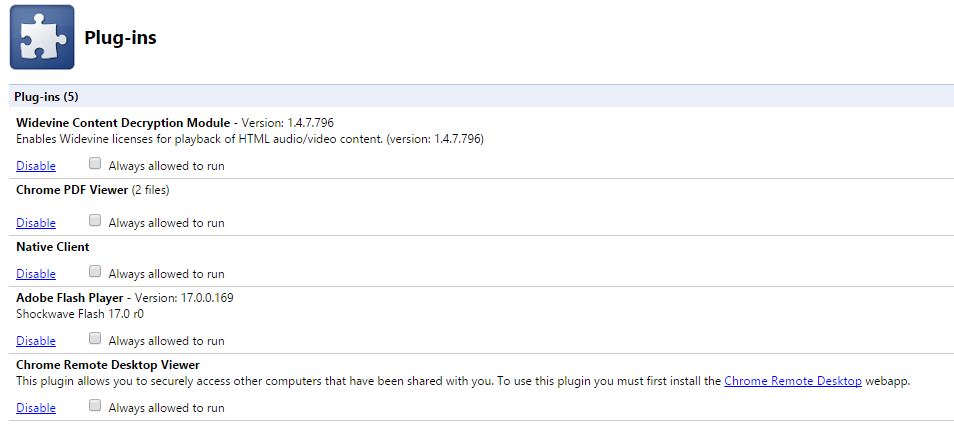
After Chrome 42 I only had 5 plugins:


  • Widevine
  • Chrome PDF Viewer
  • Native Client
  • Adobe Flash Player
  • Chrome Remote Desktop Viewer


After enabling NPAPI I had 14 plugins again!!!


  • VMware Remote Console Plug-In
  • ActiveTouch General Plugin Container
  • Silverlight
  • Citrix Receiver
  • Microsoft Office
  • Adobe Reader
  • Google Update
  • VMware Client Support Plug-in
  • Citrix Online Web Deployment Plugin


The one that hurts me most is the Microsoft office plugin and now I'm back but only for 2 more releases!

2015-04-08

OS X: 10.10.3 upgrade from Beta version and my MacBook Air is stuck, Oh no, not again!

So the new 10.10.3 is out and I thought that I upgrade my MacBook Air to the final version, but it should not be so easy. The Mac Book does not restart, so let's try to figure out and get it running again:

1) verbose mode did not help
2) as I have the backup I try to re-install OS X

This time again, I was only able to get back a working laptop with a erase harddisk, install 10.10.3 and then restore data with migration assistant.

All attempts to try to understand what and where went wrong using system.log etc. did not help me in feasible time to get the system working.

2015-02-28

OS X: reset password mountain lion

#1 fsck -fy
#2 mount -uw /
#3 launchctl load /System/Library/LaunchDaemons/com.apple.opendirectoryd.plist
#4 passwd username
The password should now change as expected, where you can then reboot and use the admin user account as expected. Rebooting is possible through the command line by by typing:
reboot

from:
http://osxdaily.com/2011/04/25/change-admin-password-mac/

2015-02-20

Lollipop: the wait is over. My Moto G (2014) has received the system update notification ... still downloading

So, not only is the Moto G (2014) extremely slow, but also the download of the new system update takes humongous time to download. It tells me I have to wait another 404 Minutes.

I thought I get easy and early access to Lollipop by getting the Moto G (2014) around the time that Lollipop came out. Boy was I mistaken, now I don' really know if I even want to spend some time with the phone to do the upgrade.

During this time I don't know if I could have downloaded a 100 OS X Yosemite images?

The Nokia Lumia Phone 535 is ok. The Moto G (2014) is not ok, it slows down a lot and makes me want to through it away.

Does Lollipop make the difference? Well for my long gone Nexus 7 (2nd), the system updates never really improved much. But let's wait for the 400 minutes plus upgrade and then try again.

2015-01-21

Apple Wireless Keyboard on a Windows Machine with Windows 8.1: Bootcamp driver to the rescue

Now for Windows 8.1 the keyboard gets paired easily again but as previously some keys don't work as expected until you install the driver from Apple Bootcamp.

http://support.apple.com/kb/DL1721

Download and then only extract AppleKeyboardInstaller64.exe.

Run it and the keyboard works perfectly fine.

2014-12-03

Trim: Windows the blog article to read

http://blogs.msdn.com/b/e7/archive/2009/05/05/support-and-q-a-for-solid-state-drives-and.aspx

Summarized: 

Trim is enabled on Windows 7 by default, if .... (read)


How to check on windows 7 if Trim is enabled?

C:\Windows\system32>fsutil behavior query DisableDeleteNotify
DisableDeleteNotify = 0


0 means apparently enabled.

2014-12-02

Internet Explorer 11: how to open xls and xlsx directly without having the download manager Open prompt

A very annoying feature if you work a lot with Excel and Sharepoint shortcuts.


  • The first time you'll get a small box at the bottom of the screen that asks if you want to open it.
  • All the other times it opens download manager and asks you if you want to open that file.
The only way I found out to make it work was with:


Windows Registry Editor Version 5.00

[HKEY_CURRENT_USER\Software\Microsoft\Windows\Shell\AttachmentExecute\{0002DF01-0000-0000-C000-000000000046}]
"Excel.Sheet.12"=hex:
"Excel.Sheet.8"=hex:

2014-11-27

27" iMac mid 2010: Hard drive failed, replacing with Crucial mx100 256GB.


A couple of challenges to overcome:

1) Will you be able to do the change?

Yes, really quite easy.

2) What disk will work?

Almost any modern SATA drive.

3) Should I use an SSD?

Definitely, but...

I prefer Crucial m550, mx100 or Samsung Evo and the like.

4) What other things should I know?

Thermal sensor should be shorted.
2.5 to 3.5" bracket for SSD
Bootable Yosemite USB Stick
Enable Trim

Here is the same in a longer form:


1) Will you be able to do the change (27" iMac mid 2010)?

Absolutely. It is even easier than the old white iMac that I had to do before. 

Here is the basic procedure as described by ifixit:


2) What disk will work?

Seems to be easy, any current 3.5 and 2.5" HDD and SDD. 2.5" needs a bracket if you don't want to tape it to the computer as I did.

There are many resources for finding out which one you want based on some criteria.

3) Should I use an SSD?

Definitely as the OS will benefit tremendously, I could not live without it. But then comes the question of size.

Currently 128GB is around $80. 256GB is around $115 to $140. 512GB is around $205 to $250 and 1TB is around $470.

I personally really like the idea of the fusion drive that the new iMacs come with. I have a 500GB big photo library and SSD would be a waste as well as my movie collection.

If I really wanna do movie editing and heavy duty work then I'd always go for a traditional HDD Raid 10 configuration. 

SSD drives come in many flavors and the real heavy duty drives cost to much and you should not use them up to more than something of 75 percent. Do not do constant delete and writes .....

So I would suggest to go for 256GB as the price is right and more than that, i.e. more than 150GB will not be necessary for your basic needs. If you got the money then the 512GB is worthwhile and for those others that really do not want another disk go for 1TB and then replace the computer when that one fails. 

4) What other things should I know?


Thermal sensor should be shorted, i.e. use a short piece of copper cable, twist it, make it a small U-form and then connect into the two sockets from the small connector (see iFixit guide to identify which sensor). Use clear tape to cover it and your good to go.

Don't forget your 2.5" to 3.5" inch bracket for the SSD to mount it.

Create a bootable Yosemite boot stick http://osxdaily.com/2014/10/16/make-os-x-yosemite-boot-install-drive/

Make sure to check for Trim. http://www.mactrast.com/2013/11/enable-trim-ssds-os-x-mavericks/

2014-11-25

Mobile Phone shootout: iPhone 5 (iOS 8.1.1), Nokia Lumia 830 DS (WP8.1), Motorola Moto G (KitKat 4.4.4) (developing article)

Well, to be honest, I do like to run around with three mobile phones at the same time and I also like to get my notifications and messages three times. That's just me.

I did not purchase the iPhone 6 as it was not really convincing and then I saw the Nokia Lumia at $90 with Dual SIM and a superb CPU. I took the liberty and bought it on the spot. There are some great articles about the 530 and they are correct, it is the perfect phone for the price you pay. (Warning the display is really old tech and will not be eye pleasing for most). I actually thought a whole lot about the purchase and if it's worth and why not go at the 630 DS at $140, that one has actually that much more to offer and is still cheap.

Then came lollipop and I was convinced that I should try an Android phone again. I really despised my Nexus 7; long gone.

My Son wanted to switch back to an iPhone so he got the old 5 from my wife and I took the liberty to use his Samsung Galaxy S4. (Boy was that a mistake for what's coming). I erased everything and started from scratch and used his 4.4.4 with all possible Google that I could get including Google Now launcher. You cannot believe what Android 4.4.4 with all Google and their newest version of apps do to you. You actually start liking android again! It's funny, colourful and a bit lame, yes. It still feels Androidish. Then my daughter asked for it and I had to give it away. Anyway that was good, since the real goal has been to spend the least amount of money to get a decent Android Phone that is capable of running Lollipop, i.e. will get it as soon as possible.

I never lost completely track of the Android phones and actually was mildly interested in the Nexus 5 as this phone has proven it's worth. Many of my colleagues had it and were super happy; that was until they touched the HTC M8 and since then that's their phone du jour. There was another phone the One Plus One but that was resold pretty quickly and some people eye the Xiaomi, but have not purchased it. So one phone stood out, not the huawaii cheapskate d

2014-11-20

Windows built-in troubleshooting tools and basic example

#
Name
Protocol
TCP/UDP Ports
Description
Comment
1
ping
ICMP
NA
ping 1.1.1.1

icmp echo, icmp reply between both end systems.
Can be used to test MTU with additional parameters

ping -f -l 1472 destIP


This will try to send the packet with MTU 1500.

1472 + 8 ICMP Header + 20 IP header = 1500

Reduce 1472 to lower number if you get errors until you reach the number that works.

(linux uses udp ports in the range of 30'000 to 33'000 and needs to be forced to use icmp
ping -M do -s 1472 -c 1 destIP

2
tracert
ICMP
NA
traceroute -d 1.1.1.1


icmp echo, with increasing time to live, starts with 1 and usually ends at 30.

Every system on the way to the end system should return a Time to live exceeded message and therefore you will be able to identify the IP of a machine in the path
If the end system does not respond the tool will continue to present up to 30 entries all with ****

(-d does not resolve DNS names, which can take longer. Better for trouble shooting to start with -d and then if you need the names rerun or do a dns lookup individually for the ones you want.)

3
telnet
TCP
any
telnet 1.1.1.1 3389
telnet 1.1.1.1 389

Can be used to test TCP on specified ports.
Somewhat dangerous as it can be misleading without a network trace if it really worked or not.

The behavior should be that you connect and it erases the content of the screen and you have  a blinking cursor in the top left corner. To end the session sometimes you have to quit cmd completely.
4
nslookup
UDP (+ TCP)
53
nslookup 1.1.1.1 2.3.4.5
nslookup system.com. 2.3.4.5

Can be tested to query a DNS server, default is UDP connection
first parameter is the label which can be IP or DNS name, please make use of FQDN with the . at the end then it will only do 2 queries instead of x (based on search suffixes)

2nd is the DNS server you want to test.

If you are not doing zone transfer and the answer is less than 512 Bytes (usually all single client connections are less) then it's always UDP otherwise it can be TCP
5
net view
TCP
445
net view \\1.1.1.1


6
nbtstat
UDP
137
nbtstat -A 1.1.1.1

7
netsh


netsh trace start capture=yes persistent=yes tracefile=c:\temp\capture.etl

Do your tests and then stop

netsh trace stop

The file can then be analyzed by Microsoft Message Analyzer
The directory uses in tracefile= must exist before you can start.
8
procmon


    • Start the tool,
    • immediately click on the  zoom glass
    • then disable everything except the network button.
    • under advanced select drop filtered events
    • add filters such as path contains 127.0.0.1 exclude


This tool is not installed by default, must be downloaded from live.sysinternals.com, is a Microsoft official tool now. 

If you don't stop the collection and configure the settings the tool will respond very sluggish at best.
9
Message Analzer


Microsoft Network Analysis tool (Wireshark).

But very important it captures traffic before it hits the windows firewall, whereas Wireshark will not see the packets if blocked by the windows firewall.


On Windows packet captures can be created without installing any software.
10
QRadar


Use Netflow tool to verify if packets travelled and in which direction etc.

Network Activity, you'll be able to see in real time the flows

11
hfs


Not installed by default, small executable, is a http server for download and upload.

Used to upload captures to my client for analysis.


So a test series should look something like this:

  • ipconfig /all on both
  • route print on both
  • ping
  • tracert
  • telnet (must be added, usually can be done without installation path/dvd, just add feature)
  • net view
  • nbtstat
  • nslookup

Here is an example of a test protocol where A-B communication did not work (only UDP and ICMP issue on a single system) but for the windows guys it was both ways for A and B.

Firewall was on but allowed the packets specified. System was a DC so 389 was also used, regular windows system should have TCP/3389(rdp), TCP/445(smb) open as well as UDP/137. Not going into protocol specifics there is much better material available.

Ping
C
to
A
ok


C
to
B
ok


C
to
E
ok


C
to
F
ok


C
to
D1, D2, D3
ok


A
to
C
ok


B
to
C
ok


A
to
B
FAILED


B
to
A
FAILED


B
to
E
ok
same network as A

A
to
F
ok
same network as B

With the help of netflow and or wireshark, netsh trace, message analyzer or procmon it was seen that A does not process incoming ICMP and UDP packets.

Further tests:

telnet
C
to
B
3389
ok

telnet
C
to
B
389
ok

net view
C
to
B
445
ok

nbtstat
C
to
B
UDP/137
ok


telnet
C
to
A
3389
ok

telnet
C
to
A
389
ok

net view
C
to
A
445
ok

nbtstat
C
to
A
UDP/137
ok


telnet
A
to
B
3389
ok

telnet
A
to
B
389
ok

net view
A
to
B
445
ok

ping
A
to
B
icmp
FAILED

nbtstat
A
to
B
udp/137
FAILED


same tests
A
to
E

all ok!


telnet
B
to
A
3389
ok

telnet
B
to
A
389
ok

net view
B
to
A
445
ok

ping
B
to
A
icmp
FAILED

nbtstat
B
to
A
udp/137
FAILED


same tests
B
to
F

all ok!


TCP connections A - B all work, only icmp and udp fail. Then it got weirder as dns to primary dns was also failing, as well as ICMP but not to 2nd IP of the primary DNS.


Reboot of the server solved the issue, but I would love to have nailed it down, maybe with procmon but was not sure.